Why menus can make or break your QSR
If you operate a quick service restaurant, you’ll know that your biggest opportunities and pain points are often found in the same place: the menu. When queues form, it is often because customers are hesitating over their choices.
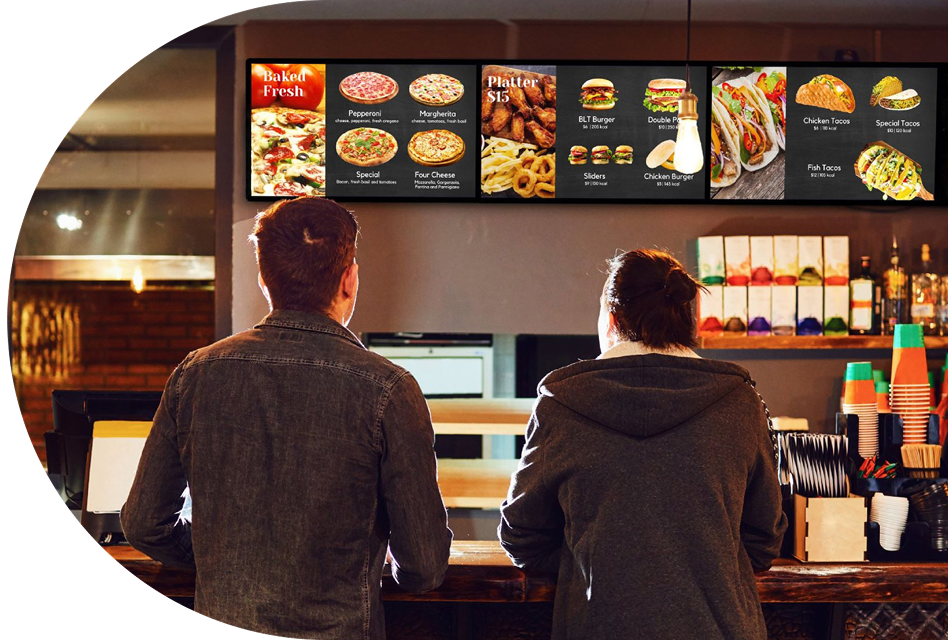
Cluttered, outdated or inconsistent boards that don’t reflect current pricing and promos make it harder to encourage sales and deliver a consistent, seamless experience. Digital menu boards can change that. They turn every screen into a flexible, data-driven sales tool that can keep up with demand in real time. Speeding up the checkout experience and saving you the stress of updating a traditional menu.
Provide a better way for customers to order
Static menu boards make agility difficult — if not impossible. Slow update cycles, inconsistent pricing between locations, outdated promos and quick fixes like taped-on flyers or handwritten signs can confuse customers and employees alike. But with digital menu boards, you can nudge customers toward combos, upgrades and add-ons that increase both order size and overall margins.
Menu design and visibility can directly influence what customers order and how quickly they make decisions. You can use this to your advantage by strategically placing high-margin items, using compelling images and providing clear pricing.
Digital menu boards allow centralised changes that go live in minutes across all locations and screens. That level of centralised control can be the difference between a top-selling promotion and a margin-killing miss.
Three ways digital menu boards can grow sales for your QSR
Digital boards do more than modernise the look of your restaurant. When connected to an enterprise POS, they can meaningfully move the numbers in three key ways.
1. Increase order size with smarter merchandising
With digital menu boards, placement is flexible, so you can clearly feature high-margin items, bundles and add-ons and rotate them by time of day, location or performance. Because the boards pull from the same item and pricing data as the POS, it becomes much easier to test new bundles, upsell strategies or featured items, then adjust quickly based on sales results — without incurring printing and installation costs. The key is to avoid overcrowding the screen. When you focus on a small set of clearly featured items instead of trying to showcase everything at once, you’ll often see better results.
2. Move more customers through the queue
Customers decide faster when menus are clear, well organised and easy to scan. For example, some operators move their top five selling items into a single, highly visible panel so repeat customers can spot and order them almost instantly, while using secondary space for new or seasonal items.
When you pair clearer menus with a streamlined workflow, you can reduce back-and-forth with staff and cut down on confusing orders. In turn, this reduces remakes and speeds up throughput during peak periods. In our experience with high-volume QSRs, shaving even 5–10 seconds off each transaction adds up to dozens more orders per hour at peak.
3. Adapt pricing and offers in real time
Waiting weeks to roll out new menus can mean lost margin and missed opportunities, especially if ingredient costs and demand change. With digital menu boards, corporate teams can use a central hub to push price changes, limited-time offers and regional promos across hundreds of locations in minutes.
This real-time control lets you respond quickly to shifts in food costs, test daypart pricing strategies and retire underperforming offers without reprinting menus or sending installers to each site, all while keeping your pricing consistent and compliant.
How a POS integration can work with digital menu boards
Digital signage on its own can look impressive, but the real value for QSRs comes when menu boards are tightly integrated with an enterprise POS platform. In our work with QSR operators, one of the most common pitfalls is standing up digital boards as a standalone project, then discovering later that they don’t stay in sync with the POS during high-volume periods.
Integration makes the POS the single source of truth for items, pricing and availability, so what customers see on the screen always matches what the system rings in. This unified approach simplifies operations for busy IT and ops teams. Instead of managing separate systems, they can sync updates across indoor and outdoor boards, kiosks, online ordering and the POS from one cloud-native platform built for resilience in high-volume environments.
How to get started with digital menu boards across your QSR locations
Moving to digital menu boards doesn’t have to be an all-or-nothing leap. A structured, data-driven rollout can help you prove value quickly and scale with confidence.
- Clarify goals and gather data. Start by defining the main problem you want digital menu boards to solve (higher average order value, shorter queues, promoting specific items) so you can measure whether the rollout is working. Use existing sales and margin reports from your POS to identify which items or categories to prioritise on screen and where you may have pricing or mix issues today.
- Design with the customer journey in mind. Build simple, scannable layouts tailored to how customers order in each channel. For counter service, focus on clear categories and featured combos. For drive thru, prioritise readability, speed and logical progression from main items to add-ons and beverages. Consistent templates across locations help maintain brand standards while still leaving room for local flexibility, but it is important to set clear guardrails so local teams don’t accidentally change high-performing layouts.
- Pilot, test and scale. Launch digital boards in a small set of locations first. Use POS and digital menu analytics to track metrics like average order value, item mix and throughput before and after the change. Once you understand which layouts, offers and placements perform best, you can standardise on those patterns and roll them out across your broader QSR network.
Before you roll out, decide what to prioritise first
If you are just getting started with digital menu boards, prioritise the locations and times where bottlenecks and missed opportunities are most visible. These are often during lunch rush or high-traffic counters. Focus first on a handful of high-margin items or bundles you want to move, and make sure your POS item, pricing and availability data is clean before you start redesigning screens; this prep work will save significant rework later.
Building a revenue-focused digital menu journey for your QSR
Busy QSRs don’t have time for menus to be static or disconnected from the rest of the tech stack. Integrated digital menu boards give you the flexibility to react faster, sell smarter and present a consistent, modern customer experience at every location.
As you evaluate options, look for a solution that unifies your POS, kitchen, and digital menu boards so your teams are working from the same playbook. An enterprise-grade solution like Genius from Global Payments can handle millions of transactions per day with offline capabilities that keep operations moving even when the network is under stress.
“In high performing restaurants, digital signage functions as a real time decisioning platform, translating operational data and customer context into personalised offers, pricing agility and measurable margin expansion at the point of choice.”
Arjun Wadwalker - Sr. Manager, Product Management, Global Payments
See what’s possible for your QSR